Agent chat / Chrome extension
Agent chat
Give a task in Chrome’s side panel and let a local coding agent work with your logged-in browser. The extension uses your installed CLI and its configured model service.
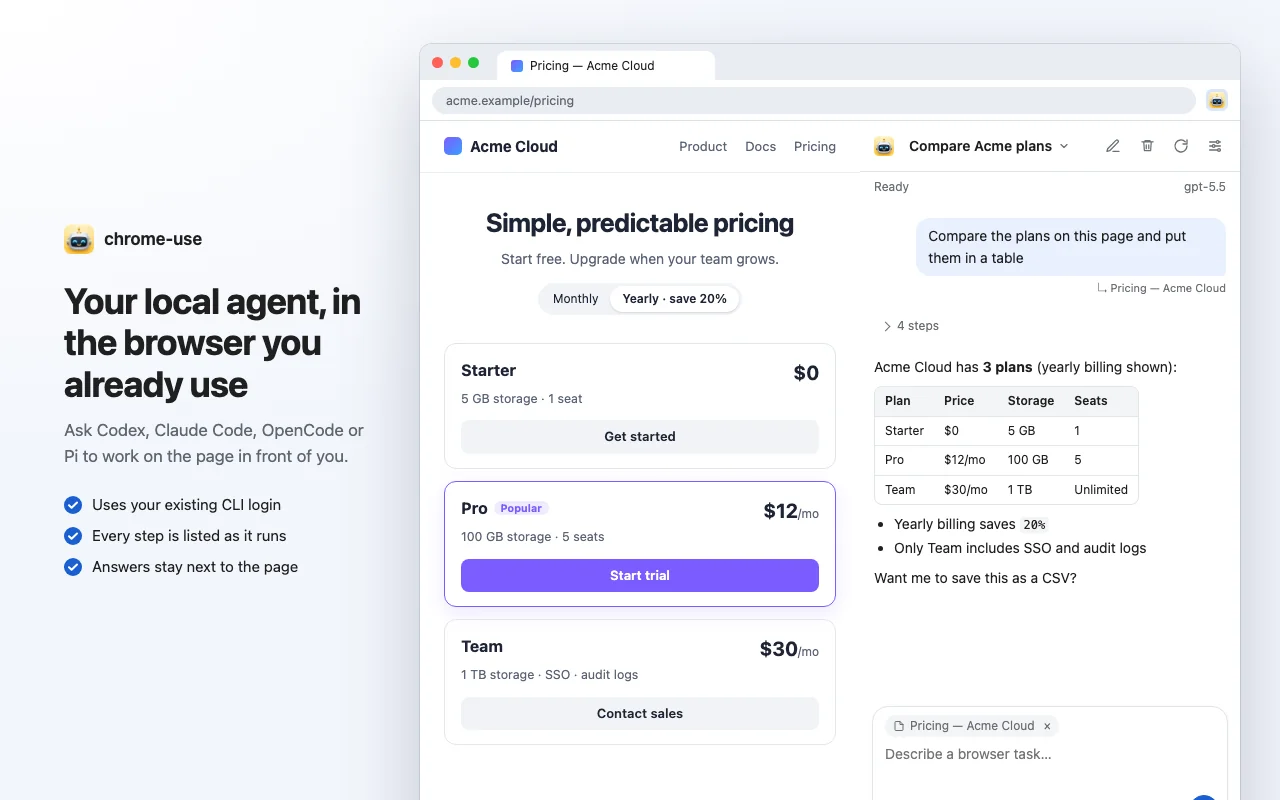
Install chrome-use, register the native host with chrome-use extension install, and install the Chrome extension. Install and sign in to at least one supported agent CLI, then open the side panel.
Start a conversation
Click the extension icon to open the side panel; Settings opens connection options. On macOS, Linux or Windows, choose Codex, Claude Code, OpenCode or Pi with your installed CLI's login. The host reports which agents it supports; older hosts may need an upgrade. Windows also supports skills, images, conversation options, schedules and configuration apply/restore. Stop, delete and option changes confirm the whole agent process tree exits. Private state uses a protected user/SYSTEM ACL; no administrator access is required. Codex uses app-server, Claude Code uses stream-json, OpenCode uses ACP, and Pi uses JSONL RPC.
Pages and models
Each conversation has its own browser session. The page tag above the composer attaches the current webpage to your next message; click × to omit it. Model choices come from the selected CLI's catalog. Default model uses its configured model; Custom model ID in the + menu overrides the choice. Reload models from CLI refreshes the catalog. A listed model or reported login does not prove execution access.
Tool access and approvals
The permission switch applies to one conversation. New chats start with Full access unless you saved another choice.
- Codex / Claude Code: turn full access off for Ask first and review approval requests. Full access runs without those prompts and automatically answers supported approvals. Agent questions still need your response.
- OpenCode: CLI permissions keeps its own rules, which may allow tools without asking. Incoming requests appear in the panel; full access answers with Allow once without changing stored rules.
- Pi: tools have no per-call approval mechanism. Browser only exposes only
chrome_useMCP tools, without shell or file tools. Full access enables the CLI's full tool set.
Queue, stop and resume
Replies stream into history, with tool rows that expand for details. Tool output does not prove the browser task succeeded. Messages sent during a response queue up; failure or interruption pauses the queue until Resume queue. Stop & send or Ctrl/Cmd+Enter waits for confirmed interruption or process exit before sending ahead of the ordinary queue. Reconnect reads history without resending.
History and deletion
Stop the response before confirming deletion from the header. Deletion removes panel history and the conversation's browser session, plus Codex rollout files, Claude session files/directories, OpenCode history through session/delete, or Pi session files inside the conversation folder. Codex's SQLite cache is untouched. Cleanup failures or unconfirmed tab closure are reported.
Privacy and configuration
Recognized sensitive fields and secret-shaped strings are masked before new tool and approval records reach the local journal. Previously known secrets are scrubbed from later display text. This does not cover your own message text, image pixels, file bytes or the CLI’s own session files; secrets discovered later cannot erase older text. Result files remain with the conversation until it is deleted. See Privacy.
History stays on this computer. The chosen CLI may send tasks and page content to its configured model service, whose privacy policy applies. The panel adds no webpage content script; opening it can change the viewport. Agents & models discovers programs and previews configuration changes, with verified writes and restore that preserves later edits.
Skills and images
Type / to choose a skill. Agents & models → Skill library edits or enables library entries and imports local folders, ZIP/.skill archives or HTTPS Git repositories. Existing user/CLI skill folders are read-only here. Skills and assets are snapshotted before sending, so queue edits and explicit retries retain their revision. Panel-bound agents can list/read skills and save library instructions with chrome_use_skills.
Paste, drop or choose up to five PNG/JPEG/WebP/HEIC files with Attach images. The local CLI converts HEIC to JPEG with the system codec: sips on macOS, the HEIF Image Extensions and HEVC Video Extensions from the Microsoft Store on Windows, heif-convert or ImageMagick with HEIF support on Linux. The converted photo is turned upright and its EXIF metadata, including GPS, is removed. Images are reduced to a 2000-pixel long edge and at most 512 KiB each. They remain with the conversation, including queued edits and retries, and are removed with it. ACP agents must advertise image input. Attachments are sent to the configured model service.
Conversation options and recurring work
Conversation options overrides allowed tools and Codex/Claude reasoning effort; Codex also supports service tier. Save while idle; the next response uses the override without editing CLI defaults. Codex cannot remove its file-reading shell. OpenCode ACP cannot enforce built-in tool restrictions. The approval switch controls automatic answers within the chosen tool scope; Pi has no per-call approvals.
Agents & models → Scheduled prompts supports intervals, daily/weekday local times and five-field cron, with agent, model, options, skill and explicit tool scope. Runs use independent background browser sessions, appear in history and notify on completion. Run now does not move the next scheduled time. Closing the panel does not stop the local service; stopping that service stops scheduling. Missed periods coalesce into one run after restart or wake. An active or unconfirmed run is never overlapped or replayed; inspect its history before acknowledging an unknown outcome.
When a panel task finishes, fails, stops, needs recovery or waits for your approval, Chrome shows a notification and the toolbar icon counts the unseen ones; clicking it opens the side panel on that conversation. The conversation the panel already shows in the focused window does not notify. Settings → Notify when a task finishes turns it off.
Chats cannot schedule more tools or automatic approval than they have. Scheduled conversations can list schedules but cannot change or trigger them, or rewrite library skills for future runs. Agent completion does not establish that the requested page effect succeeded.
A turn for each request
Requires CLI 1.5.215 and extension 0.5.58. Older extensions retain the previous view. Chrome Web Store submission, review and public availability are separate from the CLI release.
Each message has a card containing its attached page, browser steps, response, result files and turn outcome. Running steps expand; finished groups can collapse, with failed steps retained in the summary. Missing evidence in older history is labelled not recorded, never guessed.
Attached page and acting page
Sent with is the page attached when you sent the message. Acted on lists pages named by browser-action replies. An agent can open another tab, so these may differ. A cached target without an action reply is labelled Browser tools pointed at. A tab you merely activate is not recorded as a page the agent acted on.
What a passed check means
| Label | Meaning |
|---|---|
| Agent's browser checks passed | The browser checks the agent chose for this request passed. Expand them to see what was checked; this does not guarantee the checks fully express or satisfy your request. |
| Some checks passed | Some checks passed; others were not checked, failed or lack usable evidence. |
| Not checked / Blocked | No supporting check, or a blocker such as login, human verification or missing input. |
Read-back, page assertions, landing URLs and download types establish only their specific checks. An existing file does not prove correct content, and a screenshot does not automatically prove completion. A finished turn, passed browser checks and fulfillment of your request are separate facts.
Screenshots, downloads and recordings
Result cards show file type, size and availability. Reads verify content; missing or changed files become unavailable. Existence, type matching and fulfillment of the request are shown separately. Delivery to the agent's requested destination is also reported separately from the conversation's retained copy.
Check Record this task before sending to permit recording for that message. Recordings move through capture, processing and availability states. A finished answer does not mean the recording is ready; missing encoders and processing errors are reported. Recording never starts automatically for progress display.
When an outcome is unknown
Stop requested, waiting for confirmation means interruption has been requested, not confirmed. This conversation's agent has stopped refers only to this conversation, not to other agents.
- Choose Review what may have happened to inspect possibly executed actions, last pages and result files. Do not immediately repeat a send, payment or submission.
- End the old agent process is offered only when a live process can be proven to belong to this conversation.
- After its exit is confirmed, Continue in a new conversation carries a reference to the old history. Creating the conversation does not resend the previous request.
No continue action is offered while process state remains unknown. After a service restart, some platforms cannot re-establish the old process tree's state and retain the unknown result.
Long tasks and continuous history
Repeated results, repeated failures or a long period without activity raise an advisory. It does not stop or retry the task. You can stop, wait or inspect the steps. Context compaction leaves a marker while history remains available; it never turns an unchecked action into a successful one.
Related workflows
To select an element and send a code-change request to an existing local session, see Inspect & Ask.